Instant Coding with Remix IDE and WELLDONE Code
The browser-based Remix IDE, combined with the WELLDONE Code plug-in, lets you build Sui apps with no local setup or installations.
Builders unfamiliar with Sui may want to give it a try before configuring their development environment. The Remix IDE, combined with the WELLDONE Code plug-in, lets builders jump into creating apps for the Sui network from a browser window.
Remix, a web-based integrated development environment (IDE) for smart contract development, supports builders of all knowledge levels, from beginners to experts. It provides all the features you would expect from an installed IDE, including the ability to connect to a local host. However, Remix was created by the Remix Project to support Ethereum and the Solidity programming language.
Wanting a similarly easy experience to get started on Sui, we leveraged Remix's plug-in feature to create WELLDONE Code. This plug-in creates support for Sui and the Move programming language in Remix.
Although Remix is designed to get builders coding quickly, you'll need to do some initial set-up to configure it for Sui.
Set Up WELLDONE Code
You will need to do three things to begin building on Sui with our plug-in: load the Remix IDE into a browser, install the WELLDONE Code plug-in, and install the WELLDONE Wallet. If you are unfamiliar with the Remix IDE it's worth visiting the project web site and looking through the documentation and options. However, you can just as easily go straight to the Remix IDE, which offers an intuitive default workspace.
You will also need the WELLDONE Wallet, which installs as a Chrome browser extension. Go to the WELLDONE Wallet page on the Chrome Web Store and click the button to install the extension. In the wallet, you will need to either import an existing wallet, or create a new one. In the wallet interface, click the Settings icon in the lower right corner then active the Developer switch.
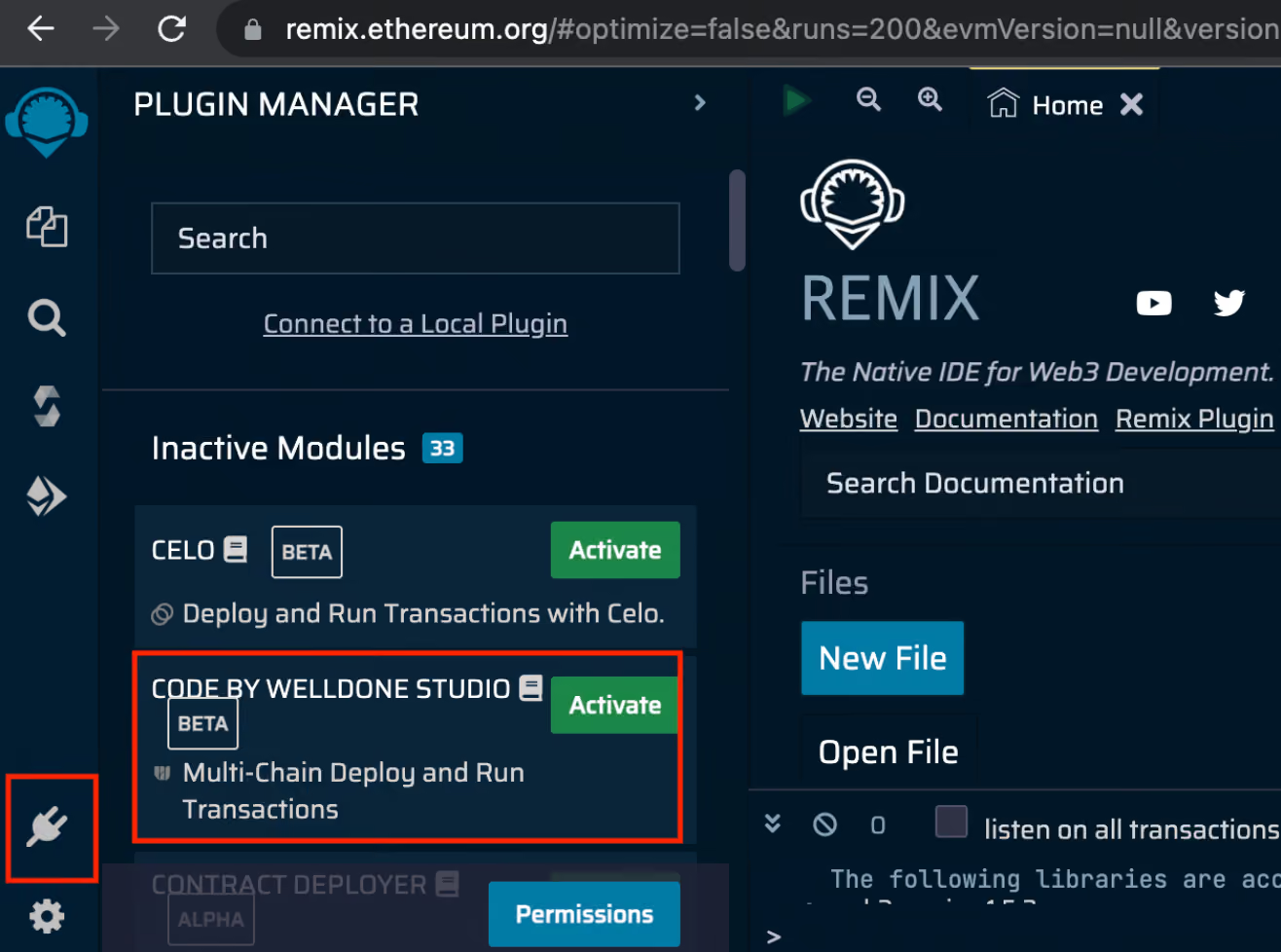
Back in the Remix IDE interface, you are now ready to install the WELLDONE Code plug-in. Simply click the plug icon in the lower left of the Remix IDE interface, then enter "Code by WELLDONE Studio" in the search bar. Alternatively you may scroll through the available plug-ins and find the entry for WELLDONE Code. Once you find it, click the Activate button.
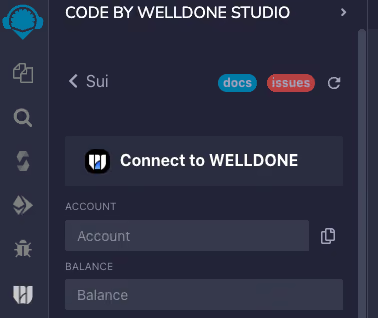
With WELLDONE Code activated, you will see a new icon in the left margin of the Remix IDE. Hover over it and it will show CODE BY WELLDONE in a tooltip. Click this icon then click SUI (MoveVM) from the list of blockchains that will appear. A new panel will open showing Sui-specific settings. Click the Connect to WELLDONE button and your wallet will ask you to approve the connection.
With the Remix IDE and the WELLDONE Code plug-in set up, you may begin creating projects on the Sui network.
Create a Project
Smart contracts on Sui use a variant of the Move programming language. The Remix IDE with the WELLDONE Code plug-in highlights syntax while you code and gives code completion suggestions as you type. Experienced builders can jump right in and begin writing smart contracts.
However, we designed WELLDONE Code to help new builders as well. It pulls up sample code at the push of a button and automatically sets up a module structure, bootstrapping projects.
In the Sui control panel on the right of the Remix IDE, choose Select a Template. Pick a template then click Create. You can edit the resultant file to fit the project you want to build.
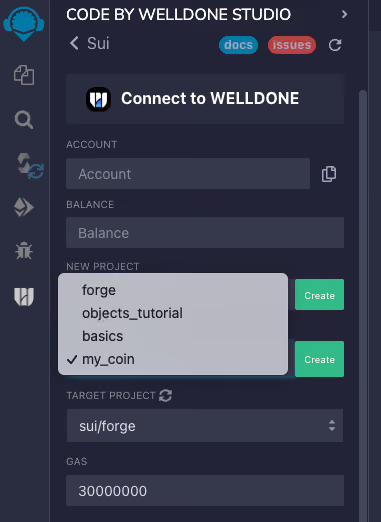
You can easily begin a new project by entering its name in the New Project field then clicking Create. WELLDONE Code will create the Move module structure, as shown below.
sui
└── <YOUR_PROJECT_NAME>
    ├── Move.toml
    ├── Move.lock
    └── sources
        └── YOUR_CONTRACT_FILE.move
You can, of course, create your own Move projects without using the features above. However, the project must be built within the sui directory for the plugin to build and deploy the Move module.
Publish to Sui
WELLDONE Code leverages the Remix IDE to test and prove your code, and can also compile and publish your modules to the Sui network. When your app is ready, choose its project name in the Target Project field and click the Compile button.
When Remix finishes compiling your project, a compiled binary file appears in the sui/<YOUR_PROJECT_NAME>/out directory. At this point, a Deploy button activates in the interface. Click this button to publish your module.
Frictionless Coding
The Remix IDE is a capable and powerful development environment, and works seamlessly on Sui when coupled with the WELLDONE Code plug-in. As it is all browser-based, there is no need to install Sui locally and set up an environment. Builders who want to try out Sui can easily explore its features and decide if they want to go further.
We also made our plug-in beginner-friendly, with tools to help new builders get started. However, more experienced builders might also enjoy the ease of working in the Remix environment.
We will continue our contributions to the Sui ecosystem by developing essential tools and making them available for quick deployment.